Your voice, in every language. In real time.
Strym turns your Mac into a simultaneous interpreter: speak your language, and your audience hears a natural voice in theirs, live on Zoom, Google Meet. Two-way translation, in real time.
Two modes, one tool
Speak to an audience.
Or with a person.
Webinar · one-way
Your course, in every language
Lectures, presentations, and live streams: your voice is transcribed, translated, and re-voiced by AI. Your audience hears a smooth, real-time translation.
You speak → Strym translates → your audience listens
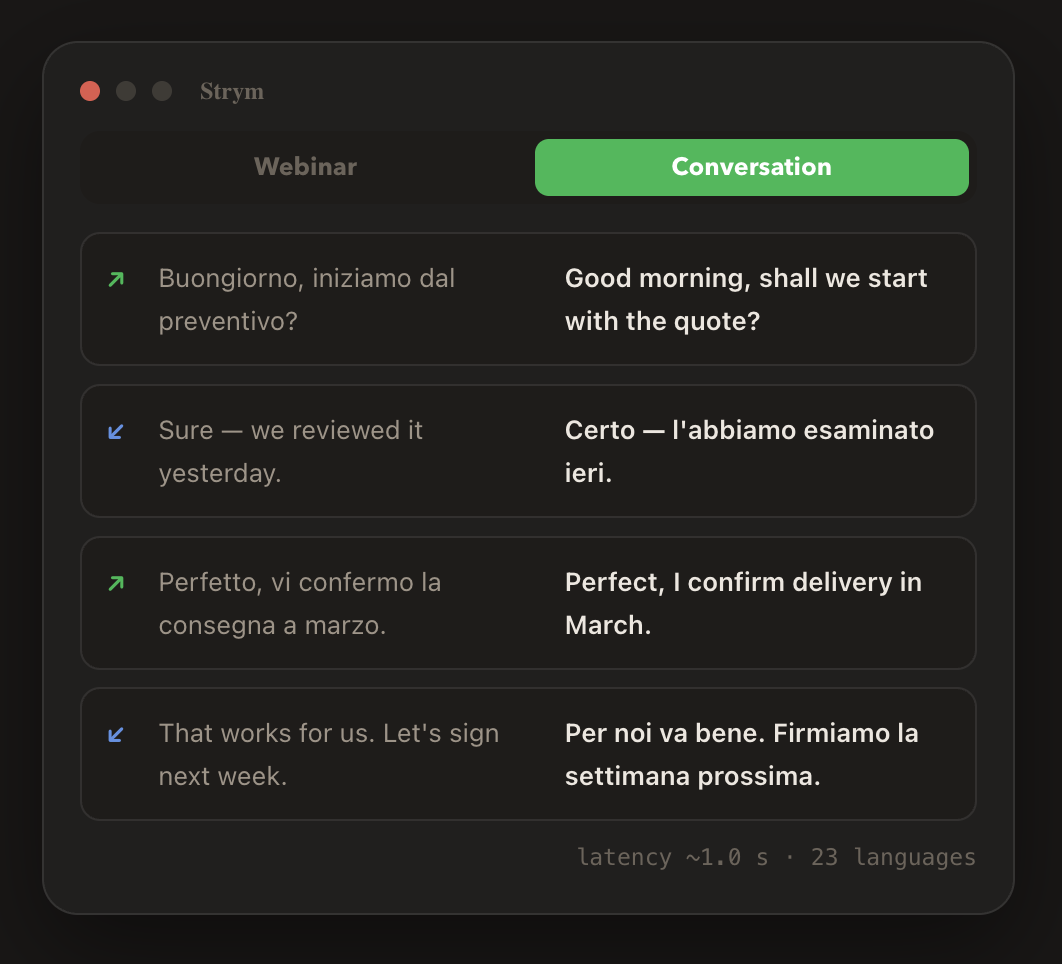
Conversation · two-way
Dialogue beyond language
Meetings, negotiations, and consultations: Strym translates both ways in real time. You speak your language, they hear theirs, and vice versa, all within a normal video call.
You ↔ them, each in your own language
How it works
Three stages, one second
1 • Speech recognition
Deepgram Nova: state-of-the-art speech-to-text with specialized models for meetings, medical, and financial terminology.
2 • AI translation
Choose your AI engine—Groq, Claude, or Gemini—and set a backup order. If one provider fails, another takes over automatically, so no sentence is lost.
3 • Voice synthesis
Choose from hundreds of natural voices by Cartesia and ElevenLabs, filtered by language, for both your voice and the one you hear.
Features that make the difference
Built for people who actually use it
23 languages
English, Spanish (4 variants), Italian, French, German, Chinese, Japanese, Arabic and more.
Custom glossary
Your field’s terminology, translated your way, in both directions. Load it from a file.
Custom vocabulary
Teach speech recognition your names, acronyms and jargon: understood on the first try.
Voice synthesis
Headphones, speakers and virtual device with independent volumes. Bluetooth headphones re-attach on their own.
Live statistics
Per-stage latency and session cost in real time, item by item.
Recording
Save the session’s translated audio in one click, ready to share.
Built for the long haul
Auto-reconnects and a Mac that never falls asleep: a 3-hour call is business as usual.
Customizable prompt
Your tone, style and rules on top of a hardened base that only ever translates.
Privacy & costs
Your keys. Your data. Your costs.
Total privacy
Strym connects directly to the AI providers with your personal API keys. Your voice never touches our servers: Mac → provider → platform. Period.
Transparent costs
You pay providers only for real usage: a one-hour call typically costs a euro or two in API fees. The in-app meter shows it live.
No lock-in
Switch models or providers anytime — even with a custom model ID, the day it’s released. Guided onboarding handles the rest.
Who Strym is for
You already have the expertise.
Now you have the language.
Curses open to an international audience, no interpreter.
Serve clients abroad in their language.
Meetings without broken English in the way.
Viewers beyond your own language.
FAQ
Frequently asked questions
No. Everything runs on your Mac. For them it’s a regular Zoom, Meet or Webex call with a voice that happens to speak their language.
About 1 seconds from the end of your sentence to the spoken translation — the rhythm of a simultaneous interpreter. The stats panel shows the real numbers for every stage.
A Mac, API keys from the providers (free to create, most include starter credits) and the free BlackHole audio driver. The setup wizard walks you through it.
With any software that lets you choose a microphone and a speaker: Zoom, Google Meet, Webex, Teams, Discord, OBS and more.
Your audio goes directly to the AI providers you chose, with your own keys. Strym has no servers listening, recording or storing anything.
Speak once.
Be understood everywhere.
Coming Soon
Strym for macOS · manual.strym.me